
Appearance
Order Dispatch Countdown
The Order Dispatch Countdown block shows a live timer on the product page with four rings for days, hours, minutes and seconds. It counts down to a dispatch date that you define, and it can skip weekends and holidays so the date it counts to is a real working day.
The timer runs in the visitor's browser and updates every second. The rings fill according to the remaining time.
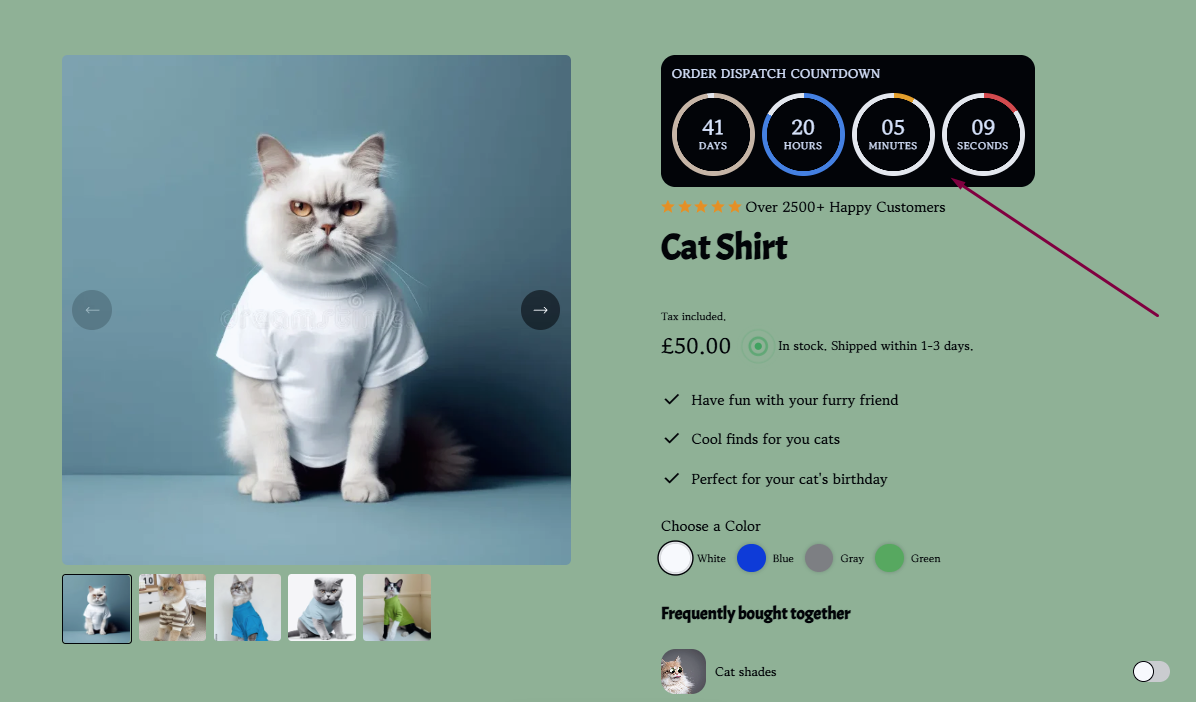
The block is available in both product sections, Product Information and Product block, with the same settings in each. One block per section.
Adding The Block
- From your Shopify admin, go to Online Store → Themes, find your Momentum theme and click Edit theme.
- Open a product page template.
- In the Product Information section (or the Product block section), click "Add block".
- Choose Dispatch countdown.
- Set the timing, colors and typography, then click Save.
Settings
Content and timing
- Heading text: the line above the rings, "Order dispatch countdown" by default.
- Countdown days range (1–100): how many dispatch days ahead the timer counts down to. Example: 30 ends 30 eligible days from today. Weekends and holidays are skipped if those options are on. 1 counts down to the next eligible day.
- Dispatch cutoff hour (local time) (0–23): the hour on the target day when the countdown ends, in the visitor's local time. Example: 17 = 5:00 PM.
- Exclude weekends from countdown range: Saturdays and Sundays are not counted, and the target day never falls on a weekend.
- Exclude holidays from countdown range: the dates in the field below are not counted.
- Holiday dates (YYYY-MM-DD, comma separated): for example
2026-12-25,2026-12-26,2027-01-01. Dates in any other format are ignored. Add next year's holidays in good time.
Colors and alignment
- Background color: the card behind the timer.
- Ring track color: the background ring.
- Days ring color, Hours ring color, Minutes ring color, Seconds ring color: the progress ring of each unit.
- Text color: heading, numbers and labels.
- Text alignment: Left, Center or Right.
Typography
| Setting | What it controls | Range | Default |
|---|---|---|---|
| Heading size (desktop) / (mobile) | the heading text | 8–24px | 12px / 11px |
| Heading font weight | the heading text | 100–700 | 600 |
| Heading text transform | the heading text | AA / Aa / aa / None | AA |
| Number size (desktop) / (mobile) | the numbers inside the rings | 10–36px | 16px / 14px |
| Label size (desktop) / (mobile) | "Days", "Hours" … under the numbers | 6–16px | 8px |
| Countdown circle size (desktop) / (mobile) | diameter of each ring | 60–160px / 50–140px | 92px / 78px |
If you make the numbers bigger, increase the circle size as well, so the numbers and labels keep some space inside the ring. On phones the four rings sit side by side, so keep the mobile circle size moderate.
Block margin
Margin bottom (desktop) and Margin bottom (mobile), 0–100px.
Tips
- Only use the countdown for a dispatch date that is real. A timer that counts down to an arbitrary date erodes trust as soon as customers notice it.
- Keep the holiday list up to date, otherwise the countdown can end on a day you do not ship.
- If you also use the Shipping Checkpoints or Status Row block, use the same cutoff hour in all of them so the dates on the page never contradict each other.